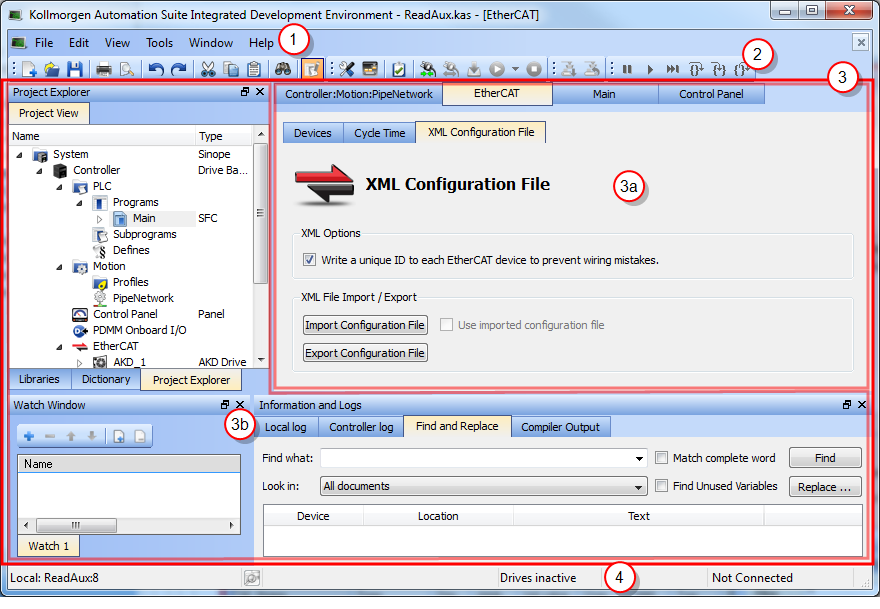
The KAS IDE"Integrated development environment" An integrated development environment is a type of computer software that assists computer programmers in developing software. IDEs normally consist of a source code editor, a compiler and/or interpreter, build-automation tools, and a debugger interface provides an all-in-one-window integrated workspace.
Figure 3-1: KAS IDEMain Window
The main view in the Integrated Development Environment (IDE) is a Multiple Document Interface (MDI"Multiple document interface" Graphical computer applications with an MDI are those whose windows reside under a single parent window (usually with the exception of modal windows), as opposed to all windows being separate from each other (single document interface). Advantages: - With MDI, a single menu bar and/or toolbar is shared between all child windows, reducing clutter and increasing efficient use of screen space - An application's child windows can be hidden/shown/minimized/maximized as a whole - Features such as "Tile" and "Cascade" can be implemented for the child windows) environment. This provides an easy-to-use and customizable view; including the capability to hide, enlarge or overlap windows in order to optimize visibility.
The main view is saved when you exit the application. This ensures that your workspace remains the same each time you open and use the KAS IDE.
The KAS IDE main window contains the following items:
 )
)

 which contains:

 displaying the current state of the target
The available toolboxes include:
You can hide/show each toolbox and toolbar directly from the contextual menus in any title bar (i.e. menu, toolbar or toolboxes).
|
Stay Connected with Kollmorgen       
|
Copyright © 2015 Kollmorgen™ |

|